Deep Dive: Setting Up AMD iGPU Passthrough in Harvester
Published:
In Part 1 we looked at how Harvester handles GPUs, exploring Passthrough vs. vGPU techniques. In this article we will deep dive into how I setup my AMD Radeon 680M to be visible to my VMs in Harvester.
Introduction
While documentation often focuses on enterprise NVIDIA GPUs, many homelab enthusiasts and edge deployments rely on the powerful RDNA2 graphics found in AMD Ryzen chips (such as the 6900HX).
However, passing an integrated GPU (iGPU) to a VM is rarely “plug-and-play.” In my deployment, the device appeared in the VM, but the driver crashed immediately. This post details the troubleshooting process and the “tribal knowledge” solution: using KubeVirt sidecar hooks to inject the correct vBIOS ROM.
The Challenge: “Fatal Error During GPU Init”
After blacklisting the amdgpu driver on the Harvester host and assigning the PCI device to the VM, the VM booted, but the GPU was non-functional. The issue is that Kubevirt cannot natively read the ROM from the integrated GPU device to pass it to the guest. We need to manually provide the vBIOS file (.bin) and the GOP driver (.rom) to the VM definition.
Architecture: Understanding the Fix
To understand how we inject this file, we must look at the KubeVirt lifecycle.
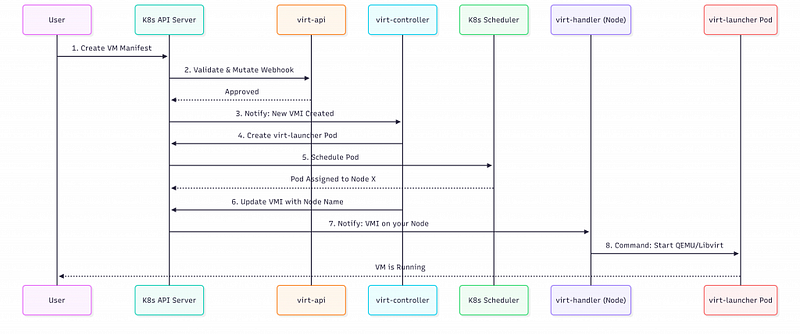
As illustrated in the sequence above:
- Step 4: The
virt-controllercreates thevirt-launcherpod. If we add a Sidecar Hook annotation, KubeVirt injects our custom container here. - Step 8: The
virt-handlercommands Libvirt to start QEMU. - The Fix: Our sidecar hook runs between these steps. It intercepts the domain XML generation (the
onDefineDomainphase), injects the<rom file=\"/path/to/vbios.bin\"/>line into the XML, and then allows the boot to proceed.
The Setup and The Problem
My hardware utilizes the AMD Ryzen 6900HX. My goal was to pass the integrated graphics to a VM.
Step 1: Host Preparation
First, you must ensure the Harvester host (the underlying OS) doesn’t grab the GPU. I blacklisted the amdgpu driver. Fortunately, on this specific hardware, I did not have to fight with ACS overrides or complex IOMMU grouping as the IOMMU groups were already separated.
Step 2: The Error
After enabling the PCI device in Harvester and assigning it to the VM, the VM was able to boot, but the GPU failed to initialize. A look at dmesg revealed the culprit:
[    3.902317] amdgpu 0000:09:00.0: ROM [??? 0x00000000 flags 0x20000000]: can't assign; bogus alignment
[    3.911541] amdgpu 0000:09:00.0: amdgpu: Unable to locate a BIOS ROM
[    3.912425] amdgpu 0000:09:00.0: amdgpu: Fatal error during GPU init
[    3.915426] amdgpu: probe of 0000:09:00.0 failed with error -22
The Solution: KubeVirt Hooks
Harvester builds on top of KubeVirt. This means we can use Sidecar Hooks to intercept the VM definition before it starts and inject specific Libvirt XML configurations.
First things first, you should enable the Sidecar feature on the Harvester host. To do so, run kubectl edit -n harvester-system kubevirt kubevirt and add the following feature gate:
apiversion: kubevirt.io/v1
kind: KubeVirt
metadata:
  name: kubevirt
  namespace: harvester-system
spec:
  configuration:
    developerConfiguration:
      featureGates:
        - Sidecar
1. Obtain the vBIOS
You need the specific vBIOS (.bin) and GOP Driver (.rom) for your specific APU. Once obtained, we need to get them inside the VM pod. For most of Ryzen iGPU you will find both files here.
2. Create the ConfigMap
We will store the binary data of the ROMs and a helper script in a Kubernetes ConfigMap. This allows us to mount these files into the sidecar.
Here is the structure of gpu_vbios.yaml. I am including the ROM binaries and a script called gpu_vbios.sh which performs the XML injection:
apiversion: v1
kind: ConfigMap
metadata:
  name: gpu-vbios
  namespace: default
binaryData:
  # Binary data for vbios_6900HX.bin and AMDGopDriver_6900HX.rom would go here
  vbios_6900HX.bin: <BASE64_ENCODED_BIN>
  AMDGopDriver_6900HX.rom: <BASE64_ENCODED_ROM>
  # The script that modifies the Libvirt XML
  gpu_vbios.sh: |
    IyEvYmluL3NoCnRlbXBGaWxlPWBta3RlbXAgLS1kcnktcnVuYAplY2hvICQ0ID4gJHRlbXBGaWxlCgpzZWQgLWkgJ3N8PGFsaWFzIG5hbWU9InVhLWhvc3RkZXZpY2UtaGFydmVzdGVyLDAwMDBlNDAwMCI+PC9hbGlhcz58PGFsaWFzIG5hbWU9InVhLWhvc3RkZXZpY2UtaGFydmVzdGVyLDAwMDBlNDAwMCI+PC9hbGlhcz48cm9tIGJhcj0ib24iIGZpbGU9Ii92YXIvcnVuL2t1YmV2aXJ0LXByaXZhdGUvY29uZmlnLW1hcC9ncHUtdmJpb3MvdmJpb3NfNjkwMEhYLmJpbiI+PC9yb20+fCcgJHRlbXBGaWxlCnNlZCAtaSAnc3w8YWxpYXMgbmFtZT0idWEtaG9zdGRldmljZS1oYXJ2ZXN0ZXItMDAwMGU0MDAxIj48L2FsaWFzPnw8YWxpYXMgbmFtZT0idWEtaG9zdGRldmljZS1oYXJ2ZXN0ZXItMDAwMGU0MDAxIj48L2FsaWFzPjxyb20gYmFyPSJvbiIgZmlsZT0iL3Zhci9ydW4va3ViZXZpcnQtcHJpdmF0ZS9jb25maWctbWFwL2dwdS12Ymlvcy9BTURHb3BEcml2ZXJfNjkwMEhYLnJvbSI+PC9yb20+fCcgJHRlbXBGaWxlCgpjYXQgJHRlbXBGaWxl
What does the script do? The gpu_vbios.sh script uses sed to find the <alias> tag for the passed-through device in the Libvirt XML. It then appends the critical <rom file=\"...\"> tag pointing to our mounted ConfigMap files.
#!/bin/sh
tempFile=`mktemp --dry-run`
echo $4 > $tempFile

sed -i 's|<alias name=\"ua-hostdevice-harvester-0000e4000\"></alias>|<alias name=\"ua-hostdevice-harvester-0000e4000\"></alias><rom bar=\"on\" file=\"/var/run/kubevirt-private/config-map/gpu-vbios/vbios_6900HX.bin\"></rom>|' $tempFile
sed -i 's|<alias name=\"ua-hostdevice-harvester-0000e4001\"></alias>|<alias name=\"ua-hostdevice-harvester-0000e4001\"></alias><rom bar=\"on\" file=\"/var/run/kubevirt-private/config-map/gpu-vbios/AMDGopDriver_6900HX.rom\"></rom>|' $tempFile

cat $tempFile
3. Apply the Hook to the VM
Finally, in the VM’s YAML configuration (accessible via “View YAML” in Harvester), we add the annotation to enable the hook sidecar. This mounts our ConfigMap and runs the script during the onDefineDomain phase.
yaml metadata: annotations: hooks.kubevirt.io/hookSidecars: >- [{ \"image\": \"quay.io/kubevirt/sidecar-shim:v1.2.0-rc.0\", \"args\": [\"--version\", \"v1alpha2\"],\n \"configMap\": {\"name\": \"gpu-vbios\", \"key\": \"gpu_vbios.sh\", \"hookPath\": \"/usr/bin/onDefineDomain\"}\n }]\n\n\nNote: Ensure your image tag matches your KubeVirt version.\n\n## Troubleshooting: The “Reboot” Bug\n\nOnce I applied this, the GPU (finally) initialized correctly! However, I encountered one final annoyance. When the Harvester host reboots, the VM would fail to start, hanging in an “Unschedulable” state because the node reportedly lacked the PCI device.\n\nWhile some suggest a full node restart, the root cause is actually the harvester-pci-device-controller. A simple restart of that pod refreshes the device list and allows the VM to schedule immediately:\n\nbash\nkubectl delete pod -n harvester-system -l app=harvester-pci-device-controller\n\n\n## Summary\n\nGetting consumer hardware to behave in an enterprise environment like Harvester is a challenge, but the flexibility of KubeVirt hooks makes it possible. By manually injecting the ROM definitions, we can leverage powerful, affordable AMD APUs for modern workloads.