Harvester GPU Support Demystified: Passthrough vs. vGPU
Published:
Introduction
Modern Hyper-Converged Infrastructure (HCI) is no longer just about CPU and RAM. From AI/ML inference at the edge to hardware transcoding pipelines, the Graphics Processing Unit (GPU) has become a first-class citizen in the data center.
Harvester, built on top of Kubernetes and KubeVirt, handles GPUs differently than traditional virtualization platforms. This article — the first in a two-part series — explores the architectural pathways available for GPU integration in Harvester and sets the stage for a complex implementation involving AMD integrated graphics.
The Two Pathways: Isolation vs. Sharing
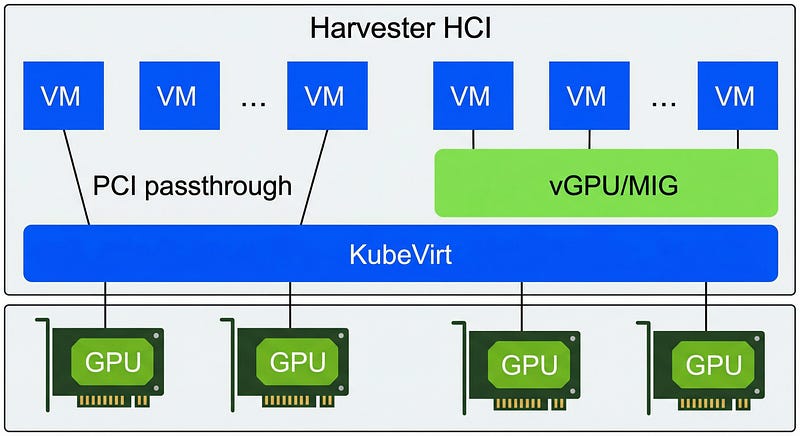
In the Harvester ecosystem, providing GPU access to a Virtual Machine generally falls into two categories: PCI Passthrough and vGPU.
1. PCI Passthrough (The “Dedicated” Lane)
PCI Passthrough is the most direct method. It involves taking a specific PCI device from the host (node) and exposing it exclusively to a single VM.
- How it works: The host kernel creates a “dummy” driver (vfio-pci) for the device, preventing the host OS from using it. The device is then passed directly to the guest VM.
- Use Case: High-performance workloads where the VM needs full control over the hardware, or for consumer-grade GPUs that do not support virtualization features.
- Limitation: It is a 1:1 relationship. One GPU serves one VM.
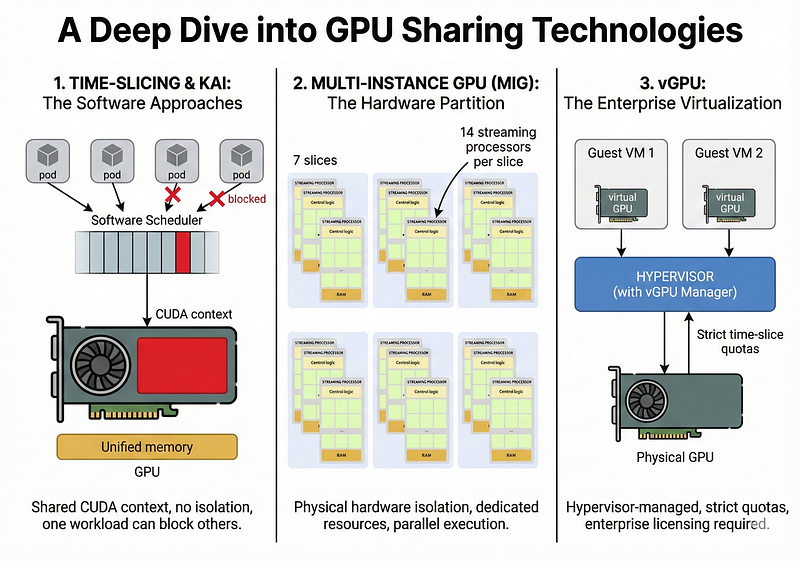
2. vGPU and MIG (The “Shared” Lane)
For enterprise-grade hardware (primarily NVIDIA Data Center GPUs like the A100 or T4), Harvester supports splitting a single physical card into multiple virtual devices.
- vGPU / MIG: Technologies like NVIDIA Multi-Instance GPU (MIG) allow you to partition GPU compute units and memory. Harvester utilizes the KubeVirt GPU device plugin to schedule these “slices” to different VMs or Pods.
- Use Case: VDI environments or shared inference clusters where maximizing resource utilization is prioritized over raw single-thread performance.
The Paradigm Shift: Harvester vs. Proxmox
If you are migrating from a traditional hypervisor like Proxmox, the Harvester approach requires a mental shift.
- In Proxmox: You often edit QEMU configuration files directly (
/etc/pve/qemu-server/100.conf) or rely on IOMMU grouping scripts. It is imperative and host-centric. - In Harvester: You operate declaratively. You do not touch the host config files directly. Instead, you define Kubernetes Custom Resource Definitions (CRDs). You enable the “PCI Devices” add-on, claiming devices by their ID. The scheduler then intelligently places your VM on the node that has that specific PCI resource available.
What’s Next?
While enterprise NVIDIA cards have well-documented “happy paths,” consumer hardware often requires deeper intervention. In Part 2, we will leave the theory behind and dive into a practical, “unsupported” configuration: passing through an AMD Ryzen 6000-series iGPU using KubeVirt hooks to fix firmware initialization errors.