A Deep Dive into GPU Sharing Technologies
Published:
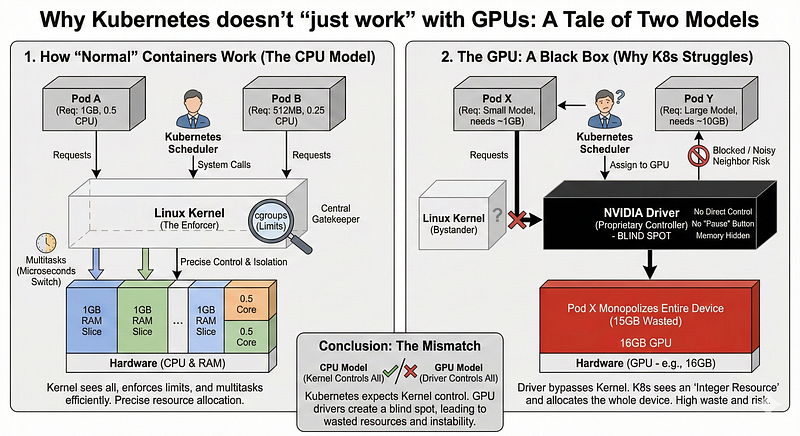
In Part 1 we explored how Kubernetes threats GPUs as a monolithic integer resource. For a massive training job, this may be a good fit. For a lightweight inference server utilizing only 2GB of an 80GB A100, it is a staggering waste of capital.
To solve this utilization crisis, platform engineers must “break the integer” and enable fractional sharing. However, not all sharing is created equal. Technologies that sound similar on paper often behave drastically differently in silicon.
This article dissects the three primary mechanisms for GPU sharing such as Time-Slicing, Multi-Instance GPU (MIG), and Virtual GPU (vGPU). We will analyze their architecture, their isolation guarantees, and the operational trade-offs that don’t appear in the marketing brochures.
1. Time-Slicing & KAI: The Software Approaches
The most accessible way to share a GPU is through software. These methods don’t change the hardware; they change how Kubernetes sees and schedules the hardware.
Standard Time-Slicing: The “Polite Lie”
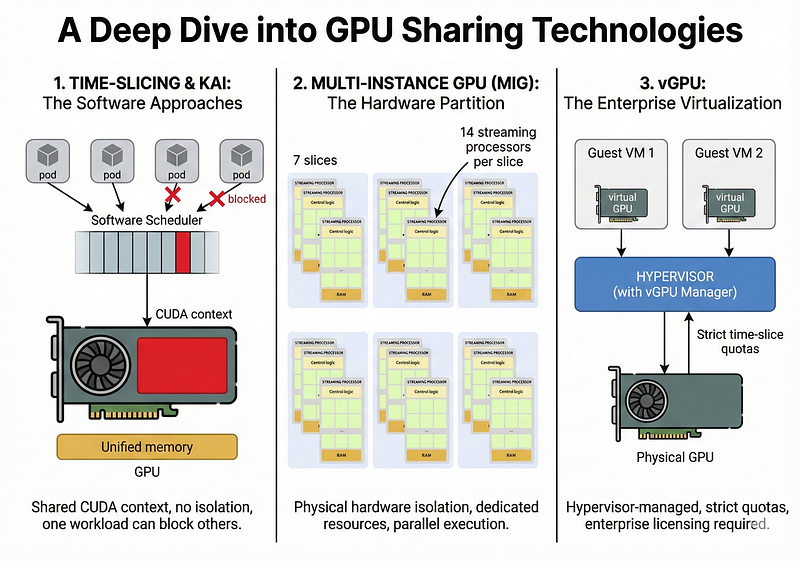
Standard time-slicing works by fundamentally misleading the Kubernetes scheduler. You configure the NVIDIA device plugin to advertise multiple “replicas” for a single physical GPU .
- The Mechanism: If you have one physical GPU, the plugin tells the Kubelet, “I actually have 4 GPUs” . Kubernetes then happily schedules four pods to that node.
- The Reality: All four pods share the same physical device and the same CUDA context. The GPU driver automatically switches between the processes, allowing them to take turns executing their workloads .
- The Limitation: This approach offers no isolation. GPU kernels (compute tasks) generally run to completion and cannot be paused . If one pod runs a heavy calculation for 30 seconds, the other pods sharing that “slice” are blocked until it finishes . Furthermore, there is no memory enforcement; one pod can crash the others by consuming all the VRAM.
KAI Scheduler: The “Reservation” Upgrade
The KAI Scheduler (Kubernetes AI Scheduler) is a more sophisticated evolution of software sharing. It attempts to solve the “blindness” of standard time-slicing by adding intelligence to the scheduling process.
- How it Works: Instead of just lying about the number of GPUs, KAI uses a “Reservation Pod”. This special pod claims the entire physical GPU from Kubernetes, effectively taking it off the market for the default scheduler .
- Intelligent Packing: When users submit workloads with specific annotations (e.g., requesting “0.2 GPU”), KAI schedules those pods next to the reservation pod on the same node .
- Better Visibility, Same Risks: KAI maintains an internal state of how much memory has been “requested” by the pods it schedules, allowing it to bin-pack workloads more efficiently than random time-slicing . However, like standard time-slicing, it cannot enforce these limits . If a pod requests 2GB but tries to use 10GB, KAI cannot stop it, and the workload may crash its neighbors .
2. Multi-Instance GPU (MIG): The Hardware Partition
If time-slicing is like roommates sharing a single television, MIG is like partitioning a house into separate apartments. Introduced with the Ampere architecture (A100), MIG allows you to carve a physical GPU into strictly isolated instances at the silicon level.
How It Works
MIG physically isolates the GPU’s internal components. It assigns dedicated Streaming Multiprocessors (SMs), L2 cache slices, and memory controllers to each instance.
For example, an A100-80GB can be partitioned into up to seven 1g.10gb instances. From the perspective of the application (and Kubernetes), these look like seven completely distinct, smaller GPUs. A workload running on “Instance 1” physically cannot access the memory or compute resources of “Instance 2.”
The Execution Reality
Unlike time-slicing, MIG offers true parallel execution. Because each instance has its own dedicated compute units, workloads run simultaneously without blocking each other. This provides a Quality of Service (QoS) guarantee that software sharing cannot match. If one tenant crashes their slice or creates a memory leak, the blast radius is contained entirely within their partition.
The Trade-offs
- Pros: Hardware-level fault isolation, predictable latency, and memory protection.
- Hardware Lock-in: Only available on expensive, high-end data center cards (A100, H100).
- The “Bin Packing” Problem: MIG profiles are rigid. You must divide the GPU into specific, pre-defined slice sizes (e.g., 10GB, 20GB). If you have a workload that needs 12GB, you must give it a 20GB slice, stranding 8GB of expensive memory that cannot be used by anyone else. Reconfiguring these profiles often requires draining the node, making dynamic scaling difficult.
3. vGPU: The Enterprise Virtualization
Virtual GPU (vGPU) is a technology rooted in the world of Virtual Desktop Infrastructure (VDI). It operates at the hypervisor level, sitting below the operating system.
How It Works
vGPU requires a manager component installed in the hypervisor (like VMware ESXi or KVM). This manager creates virtual PCI devices that are presented to guest Virtual Machines (VMs).
Each VM believes it has a dedicated GPU. The host manager handles the scheduling of commands from these VMs onto the physical engine. It can enforce strict time-slice quotas, ensuring that VM A gets exactly 20% of the GPU cycles, regardless of how heavy its workload is.
The Execution Reality
This provides the strongest form of “fairness” and isolation short of physical hardware separation. It allows for advanced features like live migration of GPU-enabled VMs. However, this technology is heavy. It typically requires a full virtualization stack and does not map cleanly to bare-metal container environments.
Note: Harvester/Kubevirt may become very handy when it comes to vGPUs. See my previous article about Harvester Passthrough vs vGPUs to learn more.
The Trade-offs
- Pros: Strong isolation, guaranteed compute quotas, live migration support.
- Cost: vGPU requires substantial per-GPU licensing fees from NVIDIA, which can significantly inflate the total cost of ownership.
- Complexity: Managing a hypervisor layer adds operational overhead that is often unnecessary for modern, cloud-native Kubernetes environments.
Summary: Choosing Your Strategy
The decision of which sharing mechanism to use comes down to your Trust Model and your Budget.
- High Trust / Low Budget (Time-Slicing): Best for internal development teams or batch workloads where occasional latency spikes or OOMs are acceptable annoyances. It maximizes utilization of older hardware but requires tenants to “play nice.”
- Low Trust / High Budget (MIG): Essential for production environments, multi-tenant SaaS platforms, or mixed workloads (e.g., training alongside inference) where one tenant cannot be allowed to impact another. The cost of the hardware is justified by the stability guarantees.
- Legacy / VDI (vGPU): Primarily relevant if you are already deeply invested in a virtualization stack like VMware and have specific needs for VM-level management.
But what if you need the memory safety of MIG but are running on commodity GPUs like the Tesla T4? Or what if you want to avoid the “bin packing” waste of MIG’s rigid profiles?
This gap has led to the emergence of Dynamic Resource Allocation (DRA). DRA is a software-based approach that sits between simple time-slicing and rigid hardware partitioning.
See you into next GPU deep-dive!