Why Kubernetes doesn’t “just work” with GPUs
Published:
If you are running standard web applications on Kubernetes, the environment feels like a high-security facility. If you allocate 1GB of RAM to a pod, the Linux kernel acts as a relentless enforcer; the moment that pod attempts to touch 1.1GB, it is instantly terminated (OOMKilled). Similarly, CPU cycles are metered with surgical precision using Completely Fair Scheduling (CFS) quotas.
However, the moment you introduce Artificial Intelligence (AI) and Machine Learning (ML) workloads into the cluster, this rigid control evaporates. You may request a single GPU for a lightweight inference model, only to find that the application has “locked” the entire $10,000 card, leaving it 90% idle while other pods sit in a Pending state.
Why is a system as sophisticated as Kubernetes so clumsy at managing GPUs? The answer lies in a fundamental architectural disconnect between the Linux Kernel and specialized hardware.
How “Normal” Containers Work (The CPU Model)
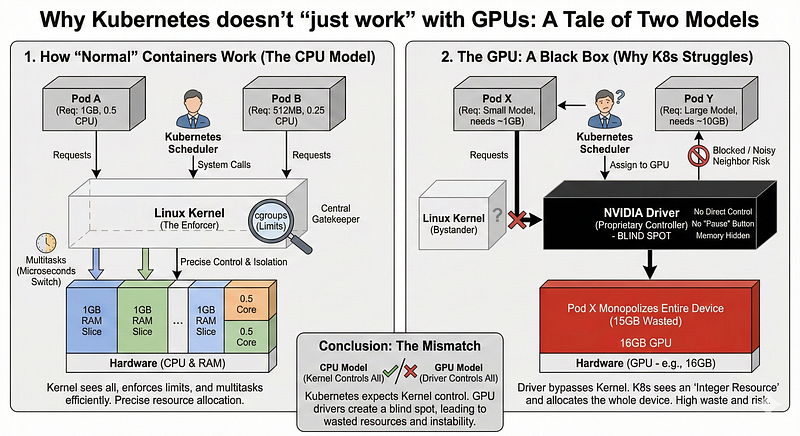
To understand why GPUs are difficult, we must look at why CPUs are “easy.” Kubernetes relies on the Linux Kernel to be the ultimate arbiter of truth.
- The Kernel Sees Everything: Every interaction a standard application has with hardware goes through the Linux kernel via “system calls”. The kernel acts as a middleman, meaning it knows exactly what every process is doing.
- The Kernel Sets Limits: Linux uses a feature called cgroups (control groups) to strictly enforce limits. If you say “limit to 256MB,” the Kernel tracks every byte and ensures the app cannot physically take more.
- The Kernel Multitasks: CPUs are designed to switch between tasks instantly (in microseconds). The Kernel can pause one app, save its state, let another run, and switch back so fast it looks like they are running at the same time.
In this world, Kubernetes is the manager, and the Kernel is the enforcer.
The GPU: A Black Box
When you plug in a GPU, this chain of command breaks. The Linux Kernel doesn’t actually know how to control a GPU. Instead, it relies on a proprietary Driver (like the NVIDIA driver) to handle everything.
This creates a “blind spot” for Kubernetes:
- No Direct Control: When an app uses a GPU, it talks to the Driver, bypassing the Kernel’s standard accounting. The Kernel sees that something is happening, but it can’t see the details.
- No “Pause” Button: Unlike CPUs, GPUs are not designed to multitask efficiently in the same way. Once a GPU starts a calculation (called a “kernel”), it monopolizes the hardware until it is finished. It cannot be easily paused or interrupted to let another app have a turn.
- Memory is Hidden: The Linux Kernel tracks system RAM page-by-page. But GPU memory is managed internally by the Driver. The Kernel (and therefore Kubernetes) literally cannot see which app is using which slice of GPU memory.
The Fix: Extension Mechanisms
To bridge this gap, Kubernetes introduced several extension mechanisms that allow it to “hand off” control to vendor-specific logic.
1. The Device Plugin Framework
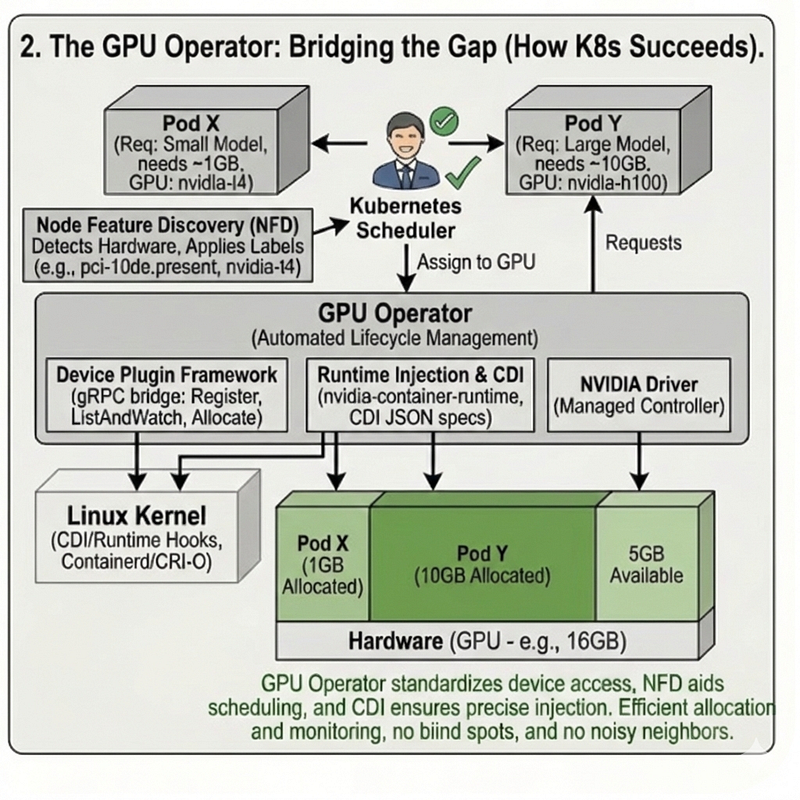
The Device Plugin is the primary bridge. It abstracts hardware into resources the Kubernetes Control Plane can track. It interacts with the kubelet via a gRPC service consisting of:
- Registration: The plugin tells the
kubeletit exists. - ListAndWatch: The
kubeletlistens for device health and status. - Allocate: When a pod is scheduled, the
kubeletcalls this interface to prepare the hardware.
2. Runtime Injection & CDI
Because standard runc cannot handle GPU hooks, we use an enhanced runtime like the nvidia-container-runtime. This acts as a wrapper that injects libraries and binaries into the container.
To standardize this, the community is moving toward the Container Device Interface (CDI). Inspired by CNI (networking), CDI uses JSON descriptor files to tell any container runtime (containerd, CRI-O) exactly how to mount a device. This decouples the vendor logic from the core Kubernetes runtime.
3. Node Feature Discovery (NFD)
The default scheduler doesn’t know the difference between an NVIDIA T4 and an H100. NFD runs as a DaemonSet, detecting hardware features and applying them as Labels (e.g., feature.node.kubernetes.io/pci-10de.present). This allows users to use nodeSelector to target specific hardware.
4. The GPU Operator
Managing the driver, the device plugin, the runtime, and monitoring tools across a cluster is an operational nightmare. The GPU Operator automates this entire stack, treating the GPU software as a managed lifecycle within the cluster.
The Kubernetes Bottleneck: Extended Resources
Because Kubernetes cannot natively inspect a GPU, it treats the hardware as an Extended Resource. In the Kubernetes scheduler, a GPU is essentially treated as an indivisible object that can be counted but not sliced.
When you define a pod spec with nvidia.com/gpu: 1, the following happens:
- The Integer Problem: Kubernetes looks for a node with an available integer of
1. It cannot natively see that your app only needs 2GB of a 16GB Tesla T4. One pod claims the entire resource. The remaining 14GB of VRAM sits idle, locked away from other workloads. - The “Noisy Neighbor”: If you force-share a GPU (by bypassing the scheduler), you lose all isolation. One greedy process can consume all the GPU’s compute cores, causing “latency spikes” for every other application on that card.
- The Crash Risk: Since Kubernetes can’t enforce memory limits inside the GPU, one app can accidentally consume all the memory. If one workload monopolizes the memory, it can cause every other app on that GPU to crash.
How the Community Is Fixing It
We are no longer in the “early days” of GPU-on-K8s. The ecosystem has developed several layers to bridge this gap:
- The Device Plugin Framework: This allows vendors (NVIDIA, AMD, Intel) to tell Kubernetes, “I have these specialized resources available,” even if the Kernel doesn’t understand them.
- Node Feature Discovery (NFD): Automatically labels your nodes with specific hardware details (e.g., “This node has an A100 with 40GB VRAM”), so the scheduler can make smarter decisions.
- The GPU Operator: A “meta-tool” that automates the installation of drivers, container runtimes, and monitoring tools, ensuring the “Black Box” is at least consistently configured across the cluster.
Conclusion
Kubernetes was built for a world where the Operating System is the boss. GPUs operate in a world where the Driver is the boss. This mismatch is the primary reason why GPU orchestration often feels inefficient and expensive compared to standard microservices.
However, understanding this gap is the first step toward closing it. In the next article, we will dive into Fractional GPUs, exploring how technologies like MIG (Multi-Instance GPU) and GPU Time-Slicing are finally allowing us to treat hardware acceleration with the same flexibility as standard CPU cycles.