Why I Run Kubernetes on Top of Kubernetes (Rancher + Harvester)
Published:
Introduction
For years, the gold standard for homelab enthusiast or DevOps engineer has been a clear-cut dichotomy: you have your hypervisor layer (Proxmox, ESXi, XCP-ng) managing the hardware, and you have your application layer (usually Kubernetes) running inside Virtual Machines (VMs).
While this works, it introduces a cognitive and operational split. You are effectively maintaining two distinct estates. You patch your hypervisor with one set of tools, and you manage your Kubernetes clusters with another. If you want to expand your cluster, you have to manually clone a template, configure networking at the hypervisor level, and then bootstrap the node.
I reached a point where I wanted my infrastructure to behave exactly like my applications: declarative, API-driven, and cloud-native. I didn’t just want to run Kubernetes. I wanted my infrastructure to be Kubernetes.
And this is where I discovered Harvester, an open-source Hyper-Converged Infrastructure (HCI) software built on top of Kubernetes. By switching to Harvester, I am effectively running Kubernetes on top of Kubernetes. I know you are screaming “that’s an overkill!”, but actually unlocks a level of automation and integration that traditional hypervisors cannot match.
What is Harvester?
To understand why Harvester is different, we have to look at the stack. Unlike a traditional hypervisor that uses a proprietary kernel or a standard Linux distribution optimized for virtualization (like Proxmox’s Debian base), Harvester is an HCI solution built on Kubernetes.
It leverages three core technologies to create a unified stack:
- SLE Micro: An immutable, lightweight Linux operating system designed for containers.
- KubeVirt: The engine that allows you to run Virtual Machines as Kubernetes Pods.
- RKE2: The secure, government-grade Kubernetes distribution that powers the underlying cluster itself. It is lightweight, hardened, and provides the actual orchestration layer on the bare metal.
- Rancher: The management plane that ties the cluster operations together.
- Longhorn: A highly available, distributed block storage system for Kubernetes.
Why I Chose Harvester for My Homelab
The decision to migrate wasn’t just about trying a shiny new tool; it was about solving specific workflow bottlenecks.
Rancher as a Single Pane of Glass
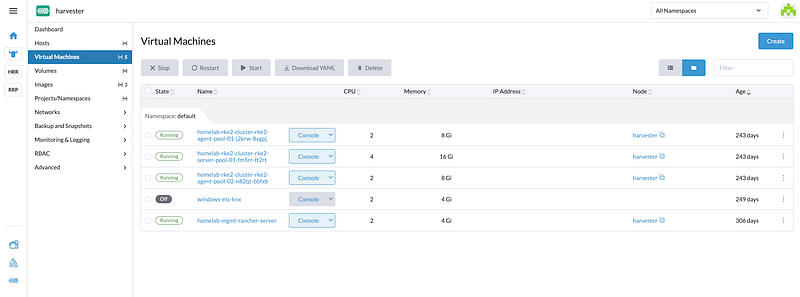
Harvester integrates natively with Rancher, the Kubernetes management platform. This integration is where the magic happens. When you import Harvester into Rancher, your virtualization cluster appears alongside your downstream application clusters.
From a single UI, I can:
- Provision a new Kubernetes cluster (RKE2 or K3s) that sits on top of Harvester.
- Watch Rancher automatically talk to the Harvester CPI (Cloud Provider Interface) to provision the VMs.
- Automatically provision storage volumes for those clusters using the Harvester CSI (Container Storage Interface).
Native Observability (Grafana & Prometheus)
Monitoring is usually a “Day 2” problem. In Proxmox, you typically have to spin up a separate VM, install Docker, and manually configure tools like Uptime Kuma or Beszel to keep an eye on your server.
Harvester treats observability as a first-class citizen. Because it is built on Kubernetes, it has native integration with the industry-standard Prometheus and Grafana stack. By simply enabling the monitoring add-on, you get pre-built dashboards showing real-time cluster IOPS, CPU pressure, and node health. You get enterprise-grade visibility without writing a single line of config.
GitOps for Metal
Because Harvester is Kubernetes, everything is a CRD (Custom Resource Definition). My Virtual Machines, my networks, and my disk images are all defined as YAML. This allows me to manage my physical infrastructure using Flux. I am no longer clicking buttons in a UI to create a VM. I am committing code to a repository.
Simplified PCI Passthrough
One area where Harvester surprisingly beats the incumbents is hardware passthrough. In Proxmox, passing a GPU or a specialized network card to a VM often involves editing GRUB files, blacklisting drivers, and praying to the IOMMU gods. Harvester abstracts this into a “PCI Devices” UI panel. You simply select the device and “claim” it. It makes running a virtualized gaming PC or a local LLM inference server significantly less painful.
Considerations
It would be disingenuous to say the migration was flawless. “Kubernetes on Kubernetes” is heavy.
Resource Overhead
Harvester is not lightweight. Because the base OS is running a full Kubernetes cluster (RKE2) plus the Longhorn storage stack, the idle RAM usage is significantly higher than Proxmox.
- Proxmox idle: ~1–2 GB RAM.
- Harvester idle: ~8–12 GB RAM (reserved for system components). If you are running a homelab on a single NUC with 16GB of RAM, Harvester is likely not for you.
Storage Performance (Longhorn vs. Local)
Longhorn is distributed block storage. It replicates data across nodes (replicas). While this provides amazing redundancy (if a node dies, your data is safe on another), it introduces network latency. For IOPS-intensive databases, you must tune Longhorn carefully or rely on local disk mapping, whereas Proxmox/ZFS handles local speeds natively with less friction.
The Learning Curve
To debug Harvester, you need to know how to debug Kubernetes. If your hypervisor crashes, you aren’t checking systemctl status libvirtd. You need to get your hands dirty with kubectl get pods -n harvester-system. This adds a layer of complexity that can be daunting if K8s is not yet your strong suit.
Is Harvester Worth It?
So TL;DR: should you wipe your Proxmox server today?
If your homelab is just a place to run a few static media servers and a Home Assistant instance the answer is no, stick with Proxmox. The native LXC support and low memory footprint make it the efficiency king.
However, if your goal is to master the cloud-native ecosystem, practice Platform Engineering, or simulate a real-world enterprise environment, Harvester is a game-changer. It forces you to stop thinking about servers and start thinking about APIs. It brings the power of the public cloud experience to your basement, allowing you to spin up clusters with code and manage your hardware with GitOps.